Project Overview
The client had started building their own Squarespace site for a real estate operations and design services business. They had content, a logo, and a clear aesthetic in mind. What they needed was someone to take that foundation and build a system around it.
My role: layout, copywriting, and overall website design. The client handled imagery and developed their own logo with direction from me. The site is built on Squarespace and is live at yourtasknest.com.
Timeline: 1 Month

The client's original site (left) and the final live version (right).
Problem Space
The client's instinct was bold pink and black. That' is the brand, and not wrong. But, applied without a controlling system, the result had no visual hierarchy. The hero was pink. The team section background was pink. The service cards were pink. The footer was black. Everything competed for attention and nothing won.
There was also a structural problem in how the site had been built. Every element had been edited individually: colors changed section by section, text block by text block. That approach couldn't scale across the whole site ecosystem. When one thing needed to change, everything needed to change.
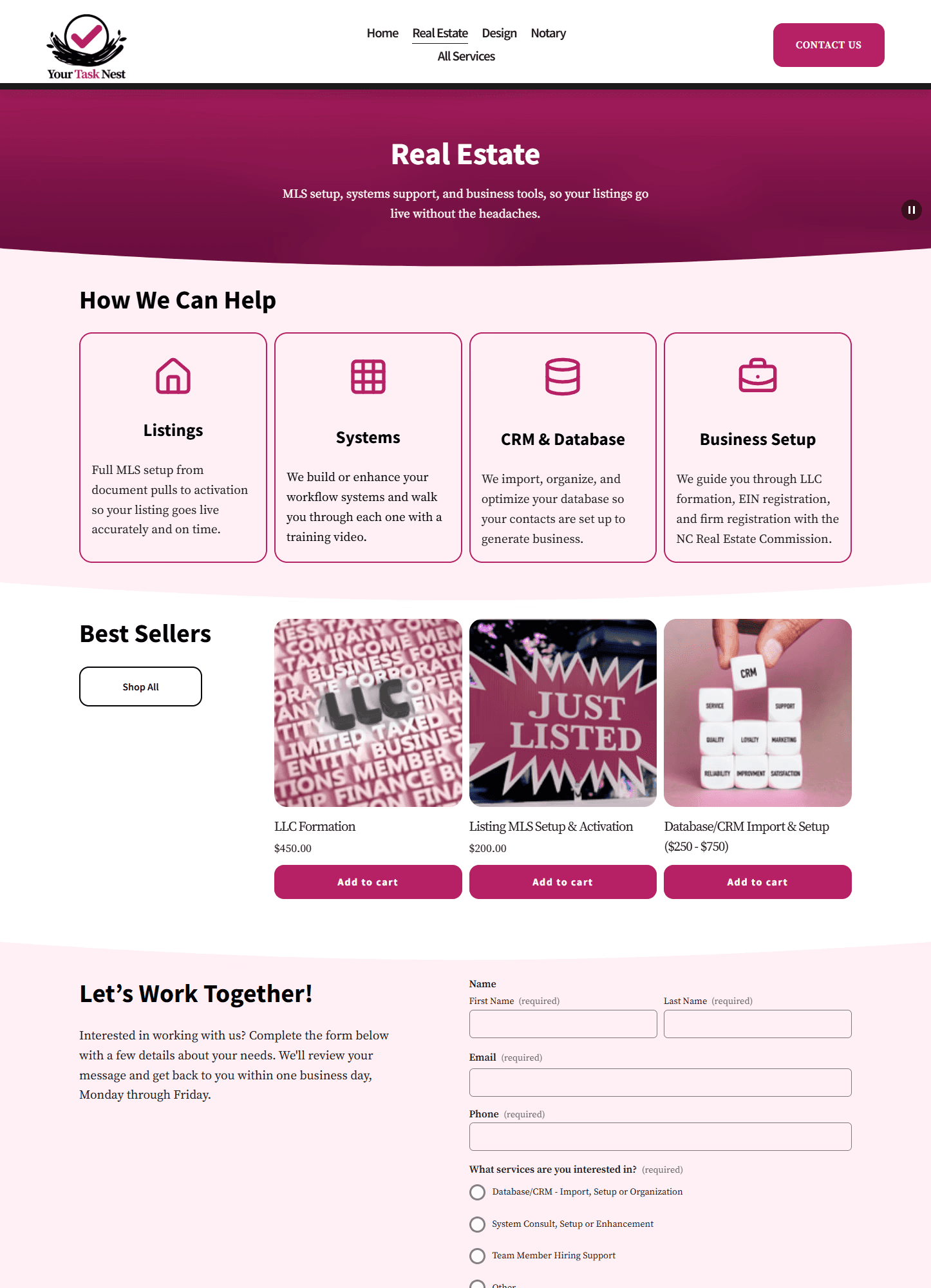
Beyond color and structure: emoji icons as visual placeholders were on the service cards (device-dependent and off-brand), oval-shaped product images on the Real Estate page (a Squarespace default that was doing the design no favors even though it was egg themed to go with the "Nest" theme), and accordion-collapsed Who We Are content that buried the mission and values behind a click that someone may or may not click.
The bones were there and a vision was formed.
Tools
Canva
Squarespace


The starting point. There were strong brand instincts, but a system needed to be in place.
Key Decisions
The most impactful change was both visual and structural. Instead of continuing to edit individual elements, I set up global site color and typography systems in Squarespace's Design settings. Four color packs: white for content sections, blush (#FFF0F5) for softer transition areas, pink (#B62064) for hero banners only, and charcoal (#1A1A1A) for the footer. From that point forward, every section pulled from a pack. This led to consistency everywhere and it was editable in one place.
Color distribution followed the 60/30/20 rule: white as the dominant surface, blush as the secondary buffer, and pink reserved for accent moments. The client wanted more pink. The reasoning for restraint wasn't preference, but considering her audience. Real estate agents looking for a professional services partner need to be able to read the page. Pink as an accent signals brand but as a background it becomes too noisy.
Typography followed the same logic: Source Sans Pro for headings, Source Serif Pro for body text. Set it up once in global settings and have it roll out everywhere else.
The icon problem required a workaround. The client's Squarespace template didn't include a native icon block. The solution: SVG icons via code blocks, pulled from Lucide with stroke color set to #B62064. This tweak gave the client what she wanted, and provided device-consistent, on brand, and visually clean design that the emoji's were detracting from.
Contact forms were a client priority. They wanted them on multiple pages and that stayed but was toned to where appropriate and tailored to the page.
Custom CSS was added to prevent the global color settings from bleeding into Squarespace's native checkout popups and commerce UI (when site color styles conflicted with unique boxes that could not be set in color settings). Without it, certain elements were not able to be viewed properly.


Three passes on the "Coming Soon - Notary" page. Original layout, structural redesign, final live version.
Trial & Error
The dark mode conversation. The client considered a dark site which would be more dramatic and have more visual weight. The counter-argument wasn't about preference but about the target audience being real estate agents, not designers or developers. A dark-only site signals tech-forward or agency-creative. That's not the message she is trying to send. Her colors would have to change to keep things AA accessible as well if things were considered dark mode. The client accepted the reasoning.
The oval images. The egg-shaped product listing images on the Real Estate page were Squarespace default behavior for a specific store section type. Removing them meant restructuring the section: a three-column grid of rectangular images with titles and prices below, consistent with the visual language of the rest of the site.
Layout changes that needed explanation. Some structural decisions that made sense from a design perspective needed to be walked through from a visitor's perspective. Showing what the path would look like for a real estate agent unfamiliar with the business (how they would take in information, what they would look for, where they might get confused) turned abstract layout logic into something concrete. Once that logic was there, the decisions made sense.
The icon workaround. After confirming that the native icon block wasn't available in this template, to meet client demands of having icons instead of emojis involved a creative solution using SVG code blocks: copy the SVG from Lucide, wrap it in a centered div, set the stroke to #B62064, drop it into a code block. It took longer to confirm the constraint than to execute the fix.


More examples of the live site with a consistent system, a clear hierarchy, and a layout built with visitors in mind.
The site is live at yourtasknest.com. Three passes from client brief to published.
What this project required was something different from building my own site. Every decision had to be explained. Not because the client was wrong to have opinions, they had some great ideas that did make the site better, but because design reasoning isn't self-evident to someone who isn't a designer. Knowing when to stand behind a decision, when to find a middle ground, and when to let the client's instinct lead was the actual work.
Content placement was one of the quieter challenges. Knowing where a piece of information belongs and where it would create friction was vital to helping the site stand on its own. The contact form question is a good example: the client wanted it everywhere. The solution wasn't to remove it, instead we pruned it from a few places to make sure each instance earned its place on the page it was on.
Working within Squarespace meant creative problem-solving at the constraint level. No native icon blocks: SVG code workaround. Global colors bleeding into commerce UI: custom CSS patch. The tool had many constraints and my job was to find what I could do inside of that.